|
|
|
|
To activate license:
Click My Server menu under the System section.
Click Activate License submenu under the System Settings section.
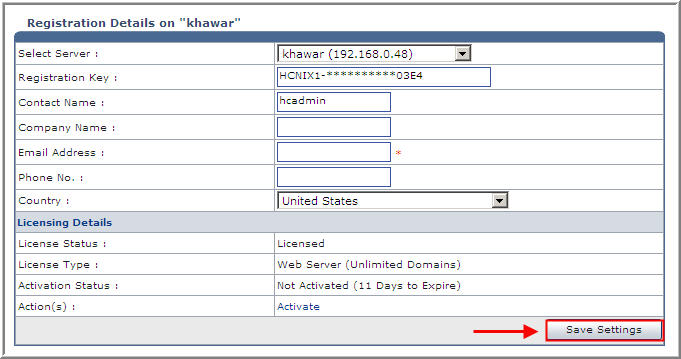
Select the required server from Select Server drop down menu.
Enter the required information and click Save Settings button.
The server/license will be registered/activated respectively.
Select Server:
Select the server from the list to activate its license as required.
Registration Key:
Specify the unique registration number in this field.
Contact Name:
Specify contact name of the user.
Company Name:
Specify company name of the user.
Email Address:
Specify email address of the user.
Phone No.:
Specify phone number of the user.
Country:
Select Country name from the drop down list.
License Status:
It shows the license status.
License Type:
It shows the license type.
See Also:

|
© Hosting Controller 1998-2011. All Rights Reserved |
