a
Hosting Controller - Windows Control Panel - Hosting Control Panel Image
 
 
Most Recent in HC7 - Hosting Control Panel and Windows Hosting Panel image
Live Support for Hosting Controller - Windows Control Panel & Hosting Servers Control Panel Image
 

HC7 Linux

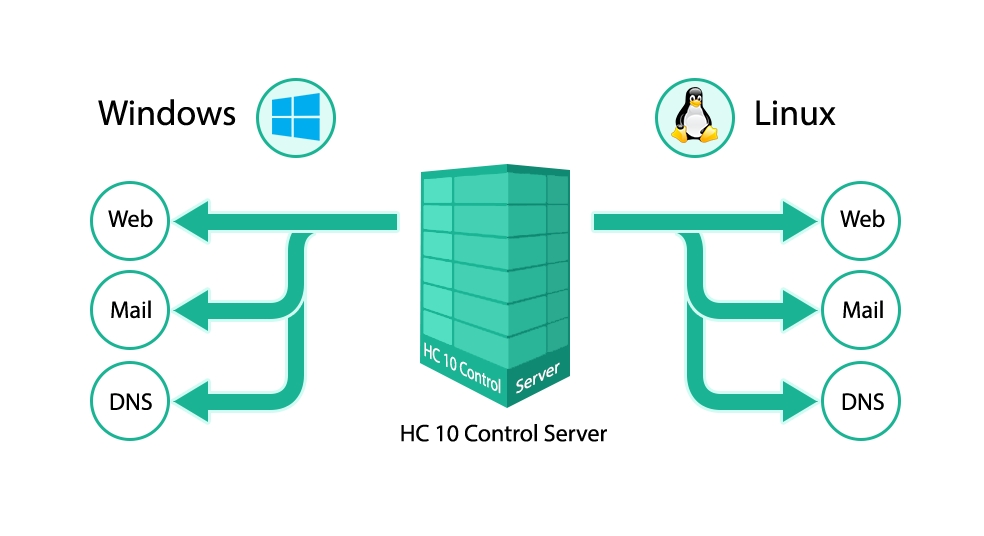
How HC7 Linux Work
HC7 gives its users the freedom to use any operating system (Windows/Linux) in their cluster, with only one limitation that the control/master server must have Windows servers installed and have a web-server role. This provides flexibility to manage Windows (IIS) and Linux (Apache) web servers simultaneously through a centralized single interface.

HC7 Linux must be part of HC7 windows panel cluster. All Linux hosting records are stored on windows server database, whereas centralized HC database gives user flexibility to access any/all servers including Windows & Linux running inside the cluster from single interface.

HC7 Supported Linux OS
  • SuSE 10.x
  • Debian 4.x
  • CentOS: 4.x, 5.0
  • Fedora Core 1, 2, 3, 4, 5, 6, 7, 8
  • Redhat® Enterprise Linux 3.0, 4.0 i586 and 64bit
HC7 Linux Supported Software
  • Vsftp
  • Wuftp
  • Qmail
  • Send Mail
  • Cold Fusion
  • Bind DNS server
  • Apache Web Server
  • MySQL Database Server
  • WebAlizer Statistic Server
  • Awstats
  • PHP /Perl Scripting language
Pre-requisites for HC7 Linux Installation
Separately install your required applications/software on your server before running HC7 Linux installer i.e. Web server/ DNS/ Mail Server etc
Backup/Restore Utility for Linux Servers
Hosting Controller offers rebuildXpress utility which is a revolutionary tool, an add-on to Hosting Controller that provides rigorous backup and simplified restoration mechanism for both Windows & Linux Servers. To read more about this utility visit rebuildXpress section.
 
 
You may also be intrested in HC7 Unmatched Benefits
  a